🛠️ Dive into our collection of DIY Kits, 🔊 Audio Amplifiers, Digital Scoreboards, FM transmitters, and more!
🎶 Explore endless possibilities at our new store.
MAKER TUTORIAL
How to convert mp3 and wav files to ad4 format- wtv020SD-16P tutorial
BUILDCIRCUIT · 2013-02-23
⚡
[product id="20165"]This article is about converting mp3 and wave files to AD4 format. This tutorial is suitable for amateurs and beginners. WTV020-SD module is a voice rewritable content type of mass storage voice module, pluggable maximum capacity of 2 GB SD card memory. It can load WAV format files and AD4 formats files.
WTV020-SD module voice chip has WTV020SD-20S master core, with MP3 control mode, the key one-to-one control mode (3 voice with the voice two), the power-loop control mode as well as the second-line serial control mode.
This article shows you how to convert an *.mp3 or a *.wav file to *.ad4 format for wtv020SD-16P music module. I have found two methods for converting the files to either formats.
Method 1: Using command prompt.
I recommend you to use command prompt method for short music files. If you want to convert a long music file, then, you should use method 2.
Follow the given procedures for converting an mp3 or a wav file to ad4 format.
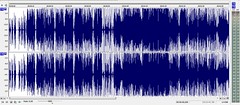
a. First of all, lower the volume of the music file.
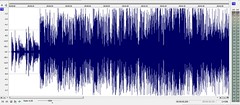
The following image shows a file with high volume.
High volume
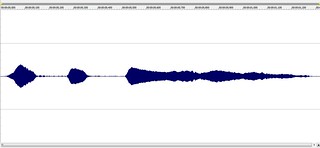
and the following image should a file with low volume sound:
Low Volume
c. Convert an mp3 format file to wav format.
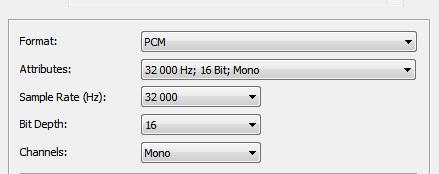
b. If you have a STEREO mp3 file, convert it to 16 bit MONO. For example, if you have an mp3 file with stereo format, your converted wav file should be in mono format.
stereo: two channels sound
mono: one channel sound
c. Set the other parameters also, for example, PCB, 16 Bit, etc.
A music editing software, for example, Sound Forge, would set all the parameters and convert the files to wav format at once.
You can use an open source sound editing software called AUDACITY for converting an mp3 file to wav format with the above stated parameters.
WATCH A VIDEO (Shows you how to lower volume and convert an mp3 file to wave format with the required parameters. It is shown on Sound Forge software)
d. Download AD4Converter.EXE
Double click AD4CONVERTER.exe to see the command set help.
Say you have a wav file at C:WavFilesTrack1.wav.
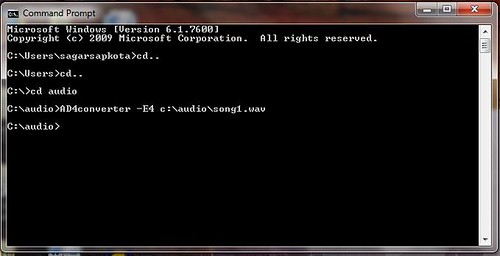
Open a Command prompt window.
Get to the root location where you copied AD4CONVERTER.exe.
Write the command which should be in the following format:
AD4CONVERTER –E4 C:WavFilesTrack1.wav
A file Track1.AD4 will be created where you have the original Track1.wav file.
WATCH A VIDEO (This video shows you how to convert a wav file to ad4 format using command prompt)
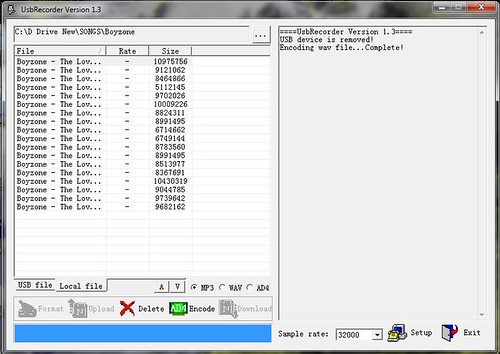
You can download the SOMO tool for converting an mp3 or wave file to ad4 format from this link or from here.One more link: Click here
There are only two easy steps in this method. First, volume reduction and second, sound format conversion.
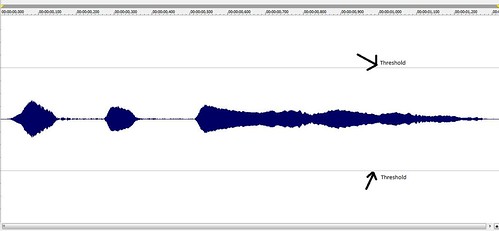
a. First of all, lower the volume of the music file. There is an upper and a lower threshold for sound amplitude which should not be crossed by your sound. If the amplitude goes over the threshold, the music module can anytime stop playing your file. Please check this article to know how to lower the volume of your music file. You can also watch a more detail video, click here.
DOWNLOAD AD4 FORMAT SAMPLE FILES- SET2-SAMPLES FILES 2 (NEW!!! uploaded on 15.1.2014)
You can buy all the components for this experiment on www.buildcircuit.com. The web store is owned and operated by buildcircuit.com. Buildcircuit.com is a reliable webstore for amateurs. It sells low cost components and offers fast shipping service.
DO NOT USE 5V POWER SUPPLY FOR THE MODULE. 5V will burn both your MicroSD card and WTV020SD module.Please use only 3.3V power, either from Arduino or use 3.3V regulator chip.[product id="20165"]
🛠️ Dive into our collection of DIY Kits, 🔊 Audio Amplifiers, Digital Scoreboards, FM transmitters, and more!
🎶 Explore endless possibilities at our new store.


 mono: one channel sound
 A music editing software, for example, Sound Forge, would set all the parameters and convert the files to wav format at once.
You can use an open source sound editing software called AUDACITY for converting an mp3 file to wav format with the above stated parameters.
WATCH A VIDEO (Shows you how to lower volume and convert an mp3 file to wave format with the required parameters. It is shown on Sound Forge software)
d. Download AD4Converter.EXE
A music editing software, for example, Sound Forge, would set all the parameters and convert the files to wav format at once.
You can use an open source sound editing software called AUDACITY for converting an mp3 file to wav format with the above stated parameters.
WATCH A VIDEO (Shows you how to lower volume and convert an mp3 file to wave format with the required parameters. It is shown on Sound Forge software)
d. Download AD4Converter.EXE
 WATCH A VIDEO (This video shows you how to convert a wav file to ad4 format using command prompt)
 Related Tutorials:
a. About WTV020SD-16P module.
b. MP3 mode of WTV020SD-16P
c. Mp3 mode and audio amplifier.
d. Basic circuit with Arduino- example 1.
e. Basic circuit (trig and select) example 2.
f. How to convert mp3/wave format files to AD4 format.
g. Troubleshooting
Video:
Related documents:
Related Tutorials:
a. About WTV020SD-16P module.
b. MP3 mode of WTV020SD-16P
c. Mp3 mode and audio amplifier.
d. Basic circuit with Arduino- example 1.
e. Basic circuit (trig and select) example 2.
f. How to convert mp3/wave format files to AD4 format.
g. Troubleshooting
Video:
Related documents: