MAKER TUTORIAL Bluetooth communication between android and arduino using FREE applications BUILDCIRCUIT · 2011-05-16
With this experimental setup you can send some text messages from your android phone to arduino and vice versa. Basically, whatever you can see on Arduino's Serial Monitor can also be seen on the interface of Bluetooth Application that I will recommend on this article.
The recommended application for this experiment is
S2 Bluetooth. You can get this application for FREE. You can try this experiment with some other FREE applications also. Visit this link:
http://www.buildcircuit.com/3-useful-applications-for-serial-data-transfer-between-android-and-arduino-using-bluesmirf-bluetooth-modem/
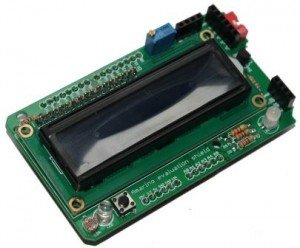
Arduino Code: DOWNLOAD (Read the details here: http://www.buildcircuit.com/how-to-send-data-from-android-to-arduino/ ) You just need to follow these easy steps: a. Connect LCD to Arduino. Follow the diagram given below.
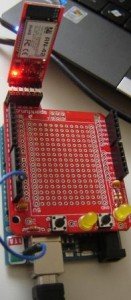
b. Connect Blue SMiRF Bluetooth module to arduino.
Connection of Bluesmirf:
TX- RX of arduino
RX-TX of arduino
VCC- VCC of arduino
GND-GND of arduino
Connect CTS-I to RTS-O
c. Change the baud rate of bluetooth module. The module should be set to baud rate of 9600Bd. You can read about changing/configuring the baud rate of bluetooth module from this link:
http://www.buildcircuit.com/how-to-change-baud-rate-of-bluetooth-modem-bluesmirf-gold-using-arduino-terminal/
d. Install S2Bluetooth Application on your phone.It is a FREE application.
Download S2Bluetooth .
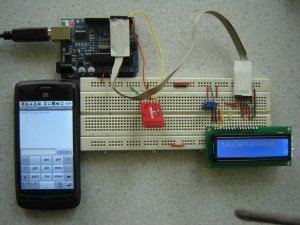
e. Then connect to the bluetooth module using the S2 Bluetooth application. Then write some text message on phone, you will see the same text message on your LCD module also.
You can try this experiment with some more FREE applications. You can know about those applications here:
http://www.buildcircuit.com/3-useful-applications-for-serial-data-transfer-between-android-and-arduino-using-bluesmirf-bluetooth-modem/
You can watch the step by step video from the following link:
VIDEO 


 Arduino Code: DOWNLOAD
(Read the details here: http://www.buildcircuit.com/how-to-send-data-from-android-to-arduino/)
You just need to follow these easy steps:
a. Connect LCD to Arduino. Follow the diagram given below.
Arduino Code: DOWNLOAD
(Read the details here: http://www.buildcircuit.com/how-to-send-data-from-android-to-arduino/)
You just need to follow these easy steps:
a. Connect LCD to Arduino. Follow the diagram given below.
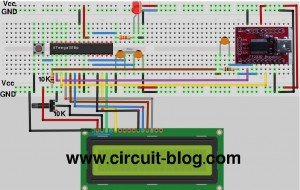 b. Connect Blue SMiRF Bluetooth module to arduino.
Connection of Bluesmirf:
TX- RX of arduino
RX-TX of arduino
VCC- VCC of arduino
GND-GND of arduino
Connect CTS-I to RTS-O
c. Change the baud rate of bluetooth module. The module should be set to baud rate of 9600Bd. You can read about changing/configuring the baud rate of bluetooth module from this link: http://www.buildcircuit.com/how-to-change-baud-rate-of-bluetooth-modem-bluesmirf-gold-using-arduino-terminal/
d. Install S2Bluetooth Application on your phone.It is a FREE application. Download S2Bluetooth.
e. Then connect to the bluetooth module using the S2 Bluetooth application. Then write some text message on phone, you will see the same text message on your LCD module also.
b. Connect Blue SMiRF Bluetooth module to arduino.
Connection of Bluesmirf:
TX- RX of arduino
RX-TX of arduino
VCC- VCC of arduino
GND-GND of arduino
Connect CTS-I to RTS-O
c. Change the baud rate of bluetooth module. The module should be set to baud rate of 9600Bd. You can read about changing/configuring the baud rate of bluetooth module from this link: http://www.buildcircuit.com/how-to-change-baud-rate-of-bluetooth-modem-bluesmirf-gold-using-arduino-terminal/
d. Install S2Bluetooth Application on your phone.It is a FREE application. Download S2Bluetooth.
e. Then connect to the bluetooth module using the S2 Bluetooth application. Then write some text message on phone, you will see the same text message on your LCD module also.
 You can try this experiment with some more FREE applications. You can know about those applications here:http://www.buildcircuit.com/3-useful-applications-for-serial-data-transfer-between-android-and-arduino-using-bluesmirf-bluetooth-modem/
You can watch the step by step video from the following link:
You can try this experiment with some more FREE applications. You can know about those applications here:http://www.buildcircuit.com/3-useful-applications-for-serial-data-transfer-between-android-and-arduino-using-bluesmirf-bluetooth-modem/
You can watch the step by step video from the following link: