🛠️ Dive into our collection of DIY Kits, 🔊 Audio Amplifiers, Digital Scoreboards, FM transmitters, and more!
🎶 Explore endless possibilities at our new store.
MAKER TUTORIAL
AVRDUDE error on Arduino programmer
Solve AVRDUDE error
BUILDCIRCUIT · 2011-01-01
⚡
While uploading a program on breadboard based arduino programmer, you might have faced an error with the following message:
avrdude: stk500_getsync(): not in sync: resp=0×00avrdude: stk500_getsync(): not in sync: resp=0×00avrdude: stk500_disable(): protocol error, expect=0×14, resp=0×00
You would probably get this error if you make programmer using the direction given on this link:
http://www.arduino.cc/en/Main/Standalone
The error occurs in the absence of a 100Ohm resistor and 0.1uF capacitor that have to be connected between FT232Rl breakout board and Atmega chip. So, you need to reconfigure the circuit in the following way:
At first, connect the components without FT232RL breakout board.
OR
OR
This picutre has been taken from arduino.cc.
visit this link: http://www.arduino.cc/en/Main/Standalone
Then, you need to connect FT232RL breakout board.
Connect the board in the following way:
The final look of the circuit:
NOTE: Keep on pressing reset switch while you connect the programmer to USB of computer and release the switch after you connect. This will definitely eliminate the AVRDUDE error.Don't forget to select the right COM port while uploading your code.Click on the video to see the avrdude error
You can watch the programmer on the following video:
Recommended links:
a. http://www.buildcircuit.com/arduino-programmer-on-breadboard-using-ft232rl/
b. http://www.arduino.cc/en/Main/Standalone
🛠️ Dive into our collection of DIY Kits, 🔊 Audio Amplifiers, Digital Scoreboards, FM transmitters, and more!
🎶 Explore endless possibilities at our new store.


 You would probably get this error if you make programmer using the direction given on this link:
http://www.arduino.cc/en/Main/Standalone
The error occurs in the absence of a 100Ohm resistor and 0.1uF capacitor that have to be connected between FT232Rl breakout board and Atmega chip. So, you need to reconfigure the circuit in the following way:
You would probably get this error if you make programmer using the direction given on this link:
http://www.arduino.cc/en/Main/Standalone
The error occurs in the absence of a 100Ohm resistor and 0.1uF capacitor that have to be connected between FT232Rl breakout board and Atmega chip. So, you need to reconfigure the circuit in the following way:

 At first, connect the components without FT232RL breakout board.
 OR
OR
 OR
OR
 This picutre has been taken from arduino.cc.
visit this link: http://www.arduino.cc/en/Main/Standalone
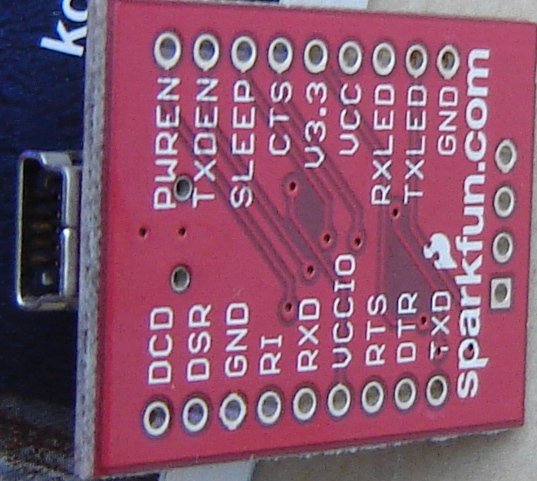
Then, you need to connect FT232RL breakout board.
Connect the board in the following way:
This picutre has been taken from arduino.cc.
visit this link: http://www.arduino.cc/en/Main/Standalone
Then, you need to connect FT232RL breakout board.
Connect the board in the following way:

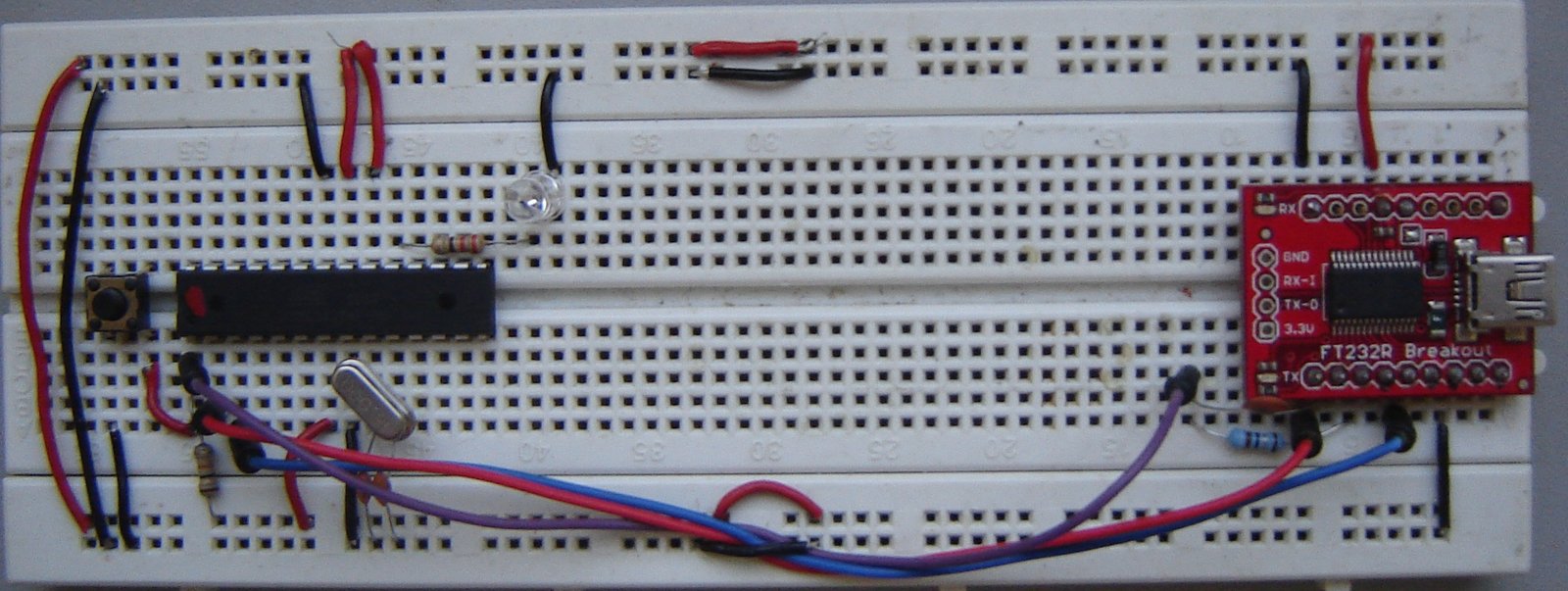
 The final look of the circuit:
 NOTE: Keep on pressing reset switch while you connect the programmer to USB of computer and release the switch after you connect.
This will definitely eliminate the AVRDUDE error.
Don't forget to select the right COM port while uploading your code.
Click on the video to see the avrdude error
You can watch the programmer on the following video:
Recommended links:
a. http://www.buildcircuit.com/arduino-programmer-on-breadboard-using-ft232rl/
b. http://www.arduino.cc/en/Main/Standalone
NOTE: Keep on pressing reset switch while you connect the programmer to USB of computer and release the switch after you connect.
This will definitely eliminate the AVRDUDE error.
Don't forget to select the right COM port while uploading your code.
Click on the video to see the avrdude error
You can watch the programmer on the following video:
Recommended links:
a. http://www.buildcircuit.com/arduino-programmer-on-breadboard-using-ft232rl/
b. http://www.arduino.cc/en/Main/Standalone