Description:The HC-SR04 ultrasonic sensor uses sonar signals to determine distance to an object. It offers excellent range accuracy and stable readings in an easy-to-use package. Its operation is not affected by sunlight or black material.However, acoustically soft materials like cloth can be difficult to detect.
- Power Supply : 5V DC
- Quiescent Current : <2mA
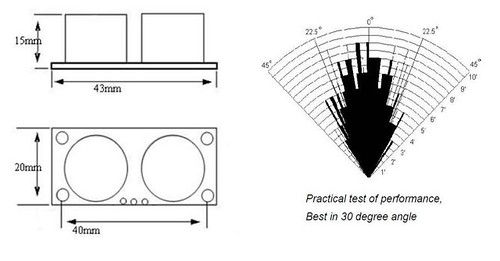
- Effectual Angle: <15°
- Ranging Distance : 2cm – 500 cm/1" - 16ft
- Resolution : 0.3 cm
 How does it work?
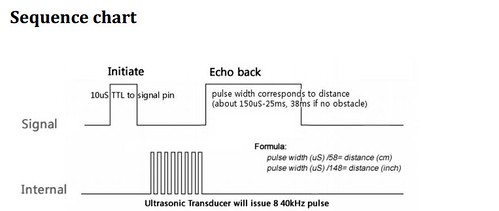
A short ultrasonic pulse is transmitted at the time 0, reflected by an object. The sensor receives this signal and converts it to an electric signal. The next pulse can be transmitted when the echo is faded away. This time period is called cycle period. The recommended cycle period should not be
less than 50ms. If a 10μs width trigger pulse is sent to the signal pin, the Ultrasonic module will output eight 40kHz ultrasonic signal and detect the echo back. The measured distance is proportional to the echo pulse width and can be calculated by the formula above. If no obstacle is detected, the output pin will give a 38ms high level signal.
How does it work?
A short ultrasonic pulse is transmitted at the time 0, reflected by an object. The sensor receives this signal and converts it to an electric signal. The next pulse can be transmitted when the echo is faded away. This time period is called cycle period. The recommended cycle period should not be
less than 50ms. If a 10μs width trigger pulse is sent to the signal pin, the Ultrasonic module will output eight 40kHz ultrasonic signal and detect the echo back. The measured distance is proportional to the echo pulse width and can be calculated by the formula above. If no obstacle is detected, the output pin will give a 38ms high level signal.
 Documents:
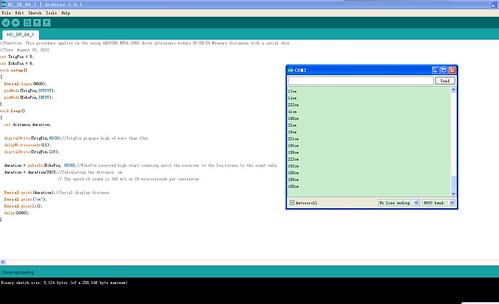
Arduino Source code
All photos
Documents:
Arduino Source code
All photos