


| Name | Quantity | Component |
|---|---|---|
| D1 | 1 | Blue LED |
| R1 | 1 | 220 Ω Resistor |
| Rpot1 | 1 | 10 kΩ, Potentiometer |
| U1 | 1 | Arduino Uno R3 |
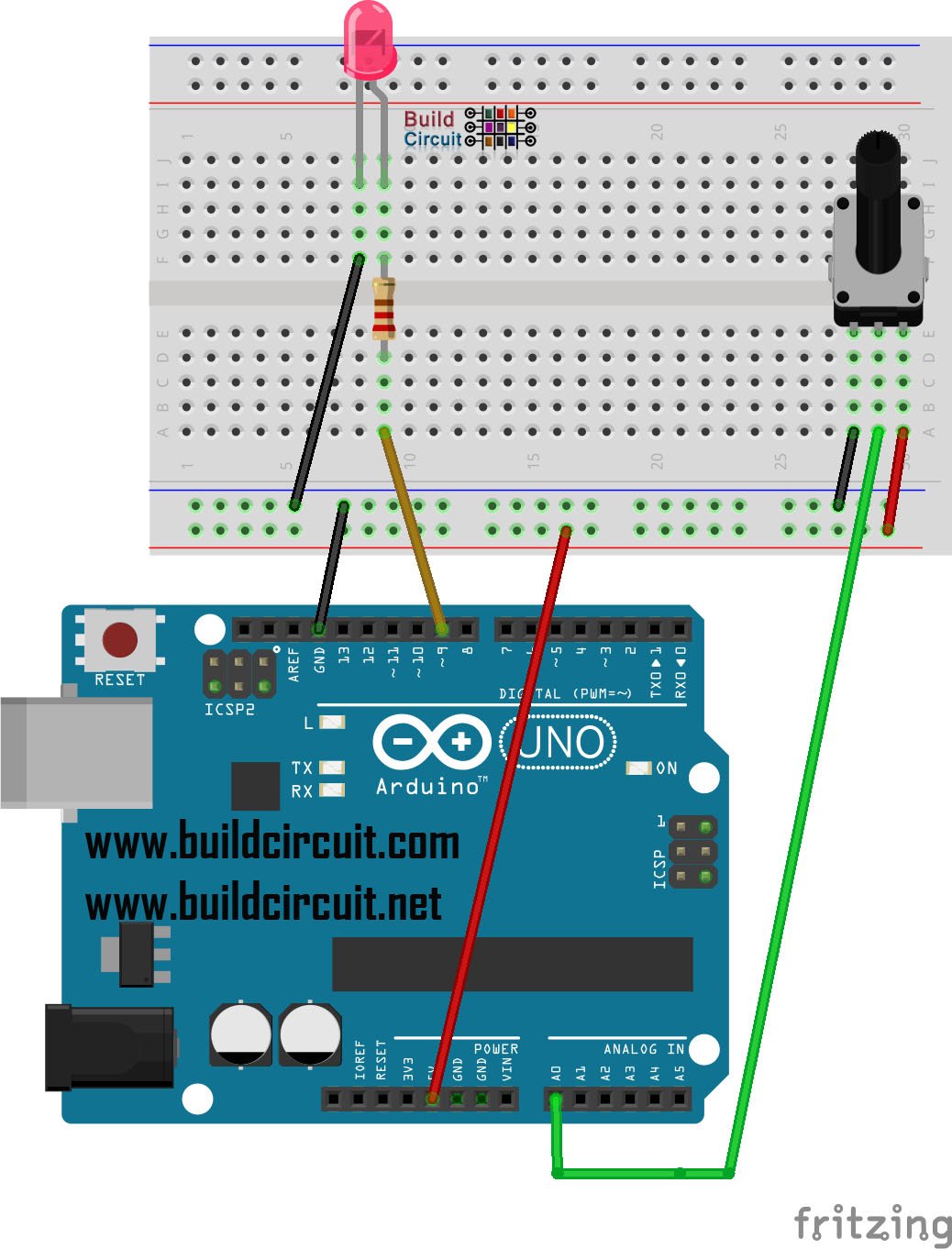


| Name | Quantity | Component |
|---|---|---|
| D1 | 1 | Blue LED |
| R1 | 1 | 220 Ω Resistor |
| Rpot1 | 1 | 10 kΩ, Potentiometer |
| U1 | 1 | Arduino Uno R3 |
Explore more circuits, Arduino projects and practical electronics tutorials.
Discover more tutorials →
Explore this hands-on electronics tutorial.
Read tutorial ↗
Explore this hands-on electronics tutorial.
Read tutorial ↗
Explore this hands-on electronics tutorial.
Read tutorial ↗
Explore this hands-on electronics tutorial.
Read tutorial ↗
Explore this hands-on electronics tutorial.
Read tutorial ↗Explore this hands-on electronics tutorial.
Read tutorial ↗