


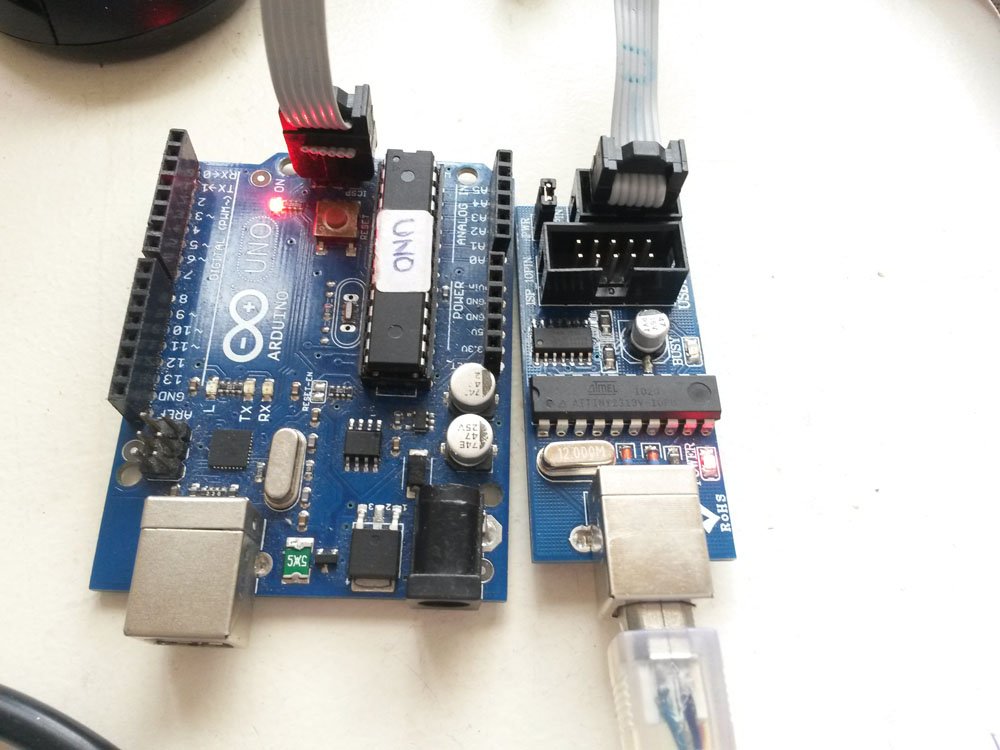
 Step 2: Go to Tools-Board-Arduino UNO
Step 3: Programmer- USBtinyISP
Step 4: Tools- Burn Bootloader
It takes less than 1 minute to burn the Arduino bootloader to your new Atmega328P-PU chip.
See all the photos on Flickr
Step 2: Go to Tools-Board-Arduino UNO
Step 3: Programmer- USBtinyISP
Step 4: Tools- Burn Bootloader
It takes less than 1 minute to burn the Arduino bootloader to your new Atmega328P-PU chip.
See all the photos on Flickr Step 2: Go to Tools-Board-Arduino UNO
Step 3: Programmer- USBtinyISP
Step 4: Tools- Burn Bootloader
It takes less than 1 minute to burn the Arduino bootloader to your new Atmega328P-PU chip.
See all the photos on Flickr
Step 2: Go to Tools-Board-Arduino UNO
Step 3: Programmer- USBtinyISP
Step 4: Tools- Burn Bootloader
It takes less than 1 minute to burn the Arduino bootloader to your new Atmega328P-PU chip.
See all the photos on Flickr
Explore more circuits, Arduino projects and practical electronics tutorials.
Discover more tutorials →
Explore this hands-on electronics tutorial.
Read tutorial ↗
Explore this hands-on electronics tutorial.
Read tutorial ↗
Explore this hands-on electronics tutorial.
Read tutorial ↗
Explore this hands-on electronics tutorial.
Read tutorial ↗
Explore this hands-on electronics tutorial.
Read tutorial ↗Explore this hands-on electronics tutorial.
Read tutorial ↗